Documentation
A free-to-use medical spell checker for your web applications
Introduction
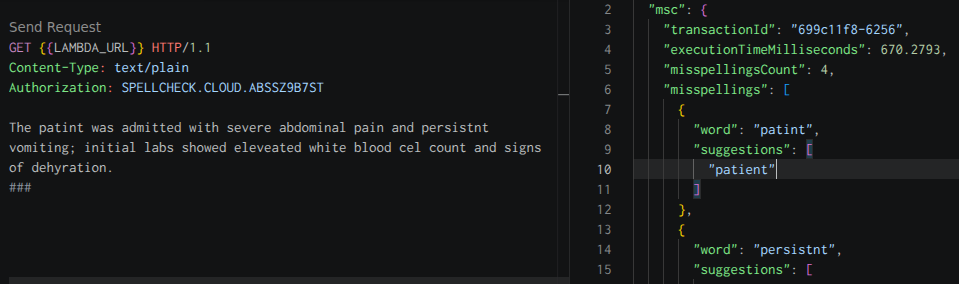
The API can be called from any programming language that can create client connections to a web URL.
The curl example below demonstrates the minimum required to use the API.
You pass the authorization token with the text you want to spell check.
1curl \
2  --request GET https://elf4snq5xlybexrnhfgfyyfvby0bttlr.lambda-url.eu-west-2.on.aws \
3  --header "Content-Type: text/plain" \
4  --header "Authorization: SPELLCHECK.CLOUD.ABSSZ9B7ST" \
5  --data-binary "The patint was admitted with severe abdominal pain and persistnt vomiting;
6  initial labs showed eleveated white blood cel count and signs of dehyration."
As this is a free service, we reserve the right to change the token as we see fit (to protect our infrastructure from abuse). Please see the error codes for more information. If you’d like a dedicated API where the token is secret for your organisation then please get in touch.
Web Application Integration
For a complete reference implementation, clone the demo project repository or try the implementation live.
To help with performance, add the following dns-prefetch tag to the head of your HTML document. See in reference project
1<link  rel="dns-prefetch"
2      href="https://elf4snq5xlybexrnhfgfyyfvby0bttlr.lambda-url.eu-west-2.on.aws" />
Set-up a DIV tag with contenteditable set to true, this is were the user will enter their clinical details.
If you change the id from clinical-narrative then the JavaScript code will also need to be updated to reflect your change.
See in reference project
1<div id="clinical-narrative"
2      contenteditable="true"
3      spellcheck="false"
4      autocorrect="off"
5      autocapitalize="none">
6  <p></p>
7</div>
Within the top section of the JavaScript file, you’ll need to define the url and key for the API.
See in reference project
1"use strict";
2
3// these values might change, if they do check the API documentation
4// for the latest info: https://spellcheck.cloud/docs.html
5
6const url = 'https://elf4snq5xlybexrnhfgfyyfvby0bttlr.lambda-url.eu-west-2.on.aws/';
7const key = "SPELLCHECK.CLOUD.ABSSZ9B7ST";
The checkButtonPressed function is invoked when the HTML button element is pressed and defines the main
functionality for the demo. Please take a moment to review the reference project
 1function checkButtonPressed () {
 2    // get the elements once to save having to query the DOM multiple times,
 3    // and to ensure we have the correct reference to the text content
 4    // before any modifications are made for highlighting
 5    const checkButton = document.getElementById("check-button");
 6    const container = document.getElementById("clinical-narrative").firstElementChild;
 7    const resultsEl = document.getElementById("spellcheck-result");
 8    const textToCheck = container.textContent;
 9
10    // exit early if a previous spell check has already annotated the text
11    // and the user hasn't resolved or ignored the misspellings
12    if (container.querySelector('span.word-editor')) {
13        alert("Please resolve or ignore all highlighted words
14               before running the spell check again.");
15        return;
16    }
17
18    // disable the button and provide feedback
19    // to the user while the check is in progress
20    checkButton.disabled = true;
21    checkButton.style.opacity = "0.6";
22    checkButton.textContent = "Checking...";
23
24    // call the function to check spelling,
25    // passing the text content and API URL
26    checkSpelling({ url, textToCheck })
Response
The API will respond with an HTTP status code of 200 if successful.
An example of the JSON response is shown below.
The response contains some meta data which you can log & track internally within your application to provide telemetry data on usage.
Each response will have a unique transaction id with the execution time measured in milliseconds. It returns how many words were checked and if misspellings were detected together with a count of miss spelled words.
 1{
 2  "transactionId": "8815e16c-c19a",
 3  "executionTimeMilliseconds": 665.6316,
 4  "wordsCheckedCount": 44,
 5  "misspellingsFound": true,
 6  "misspellingsCount": 5,
 7  "misspellings": [
 8      {
 9          "word": "patint",
10          "suggestions": [
11            "patient",
12            "patent"
13          ]
14      },
15      {
16          "word": "persistnt",
17          "suggestions": [
18            "persistent",
19            "persister",
20            "persisting"
21          ]
22      },
23  ]
24}
Error Codes
The API may return one of the following error conditions and you should check the HTTP response code after each request.
🚨 400 Bad Request
If the API returns a HTTP status code of 400 it’s most likely due to no text being provided for spell checking.
The API will return a JSON response with an error message like the one shown below.
1{ "error": "Request body is required" }
🚨 401 Unauthorized
If the API returns a HTTP status code of 401 it’s most likely due to us rotating the authorization token.
The API will return a JSON response with an error message like the one shown below.
1{
2  "error": "Unauthorized, the authorization header has probably expired,
3            please consult the documentation to acquire the current authorization token.
4            (https://spellcheck.cloud/docs.html)"
5}
🚨 500 Internal Server Error
We pride ourselves on developing robust solutions, so if you encounter a HTTP status code of 500 then something
has gone horrible wrong, please contact us reporting the issue.